Free to usePremium unlocks more inside
A screen made for small hands.
Kid view shows one child their day in big, friendly buttons: what's happening, their routines and their chores, plus how many stars they've earned this week.
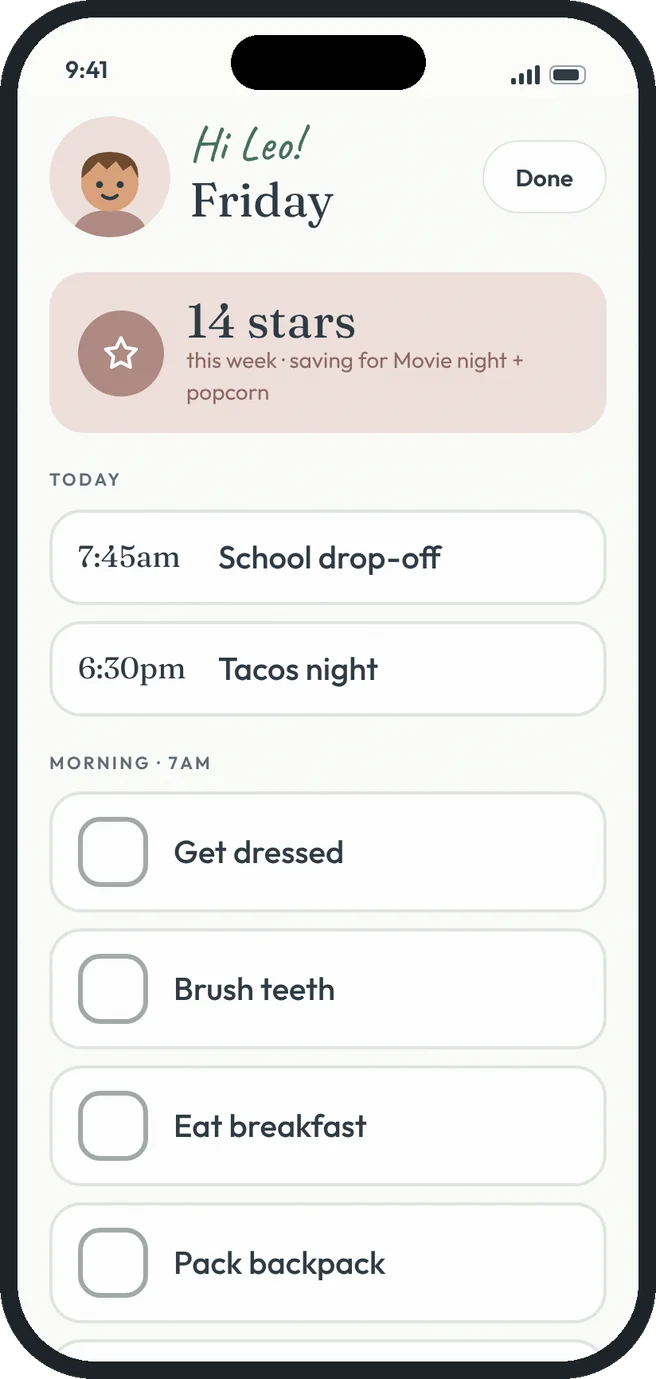 hi Leo!
What you can do
Kid view, the HeyTribe way.
Just their day
Only their plans, routines and chores. Nothing else to wander into.
Big buttons
Steps and chores are large enough for little fingers.
Stars up top
Their star count and what they're saving for, right at the top.
Any device
Hand them your phone or leave it open on a family tablet.
Same live data
Every tap updates the family's chore chart and routines.
One tap back
Tap Done to return to the full app.
Free and Premium
Free gets you going. Premium goes further.
FreeEvery family, forever
- Kid view for every kid
- Today's plans, routines and chores
- Big tap-to-check buttons
Premium$4.99 a month for the whole tribe
- Star count and reward progress
- Leave it open on a family tablet all day
- Chore stamping from Kid view
How it works
Three steps. That's it.
- 1
Open Kid view
From More or Family and settings, pick the kid.
- 2
Let them go
They tick off steps and stamp chores.
- 3
Tap Done
You're back in the full app.
Good questions.
Can kids change settings from Kid view?
No. Kid view only shows their own day and a Done button.
Does each kid need an account?
No. Add them to your tribe and open their view on any device.
More answers in the help center.
Works well with