One list everyone writes on.
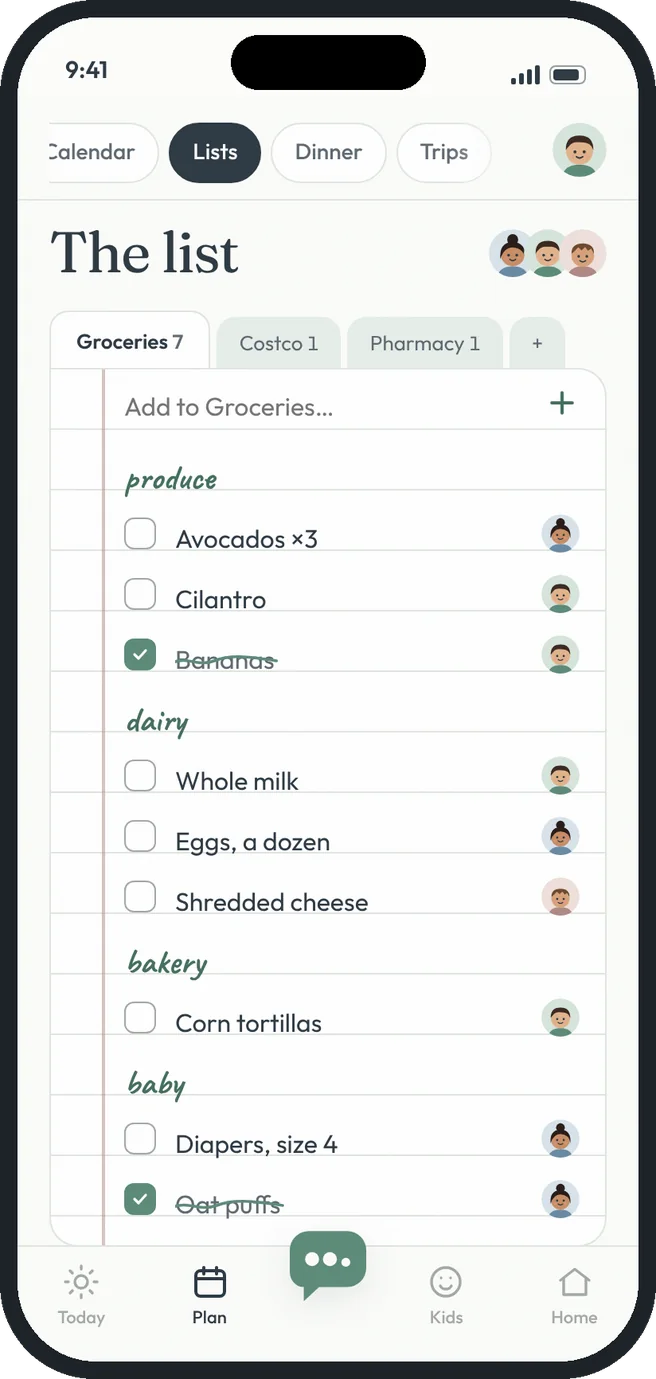
Add milk from the couch and it's waiting in the cart at the store. Items sort themselves by aisle, and you can see who added what.
 milk, again
Grocery and shopping lists, the HeyTribe way.
Live for everyone
When anyone adds or checks off an item, everyone sees it right away.
Sorted by aisle
Produce, dairy, bakery, pantry, baby and more, sorted for you.
More than one list
Groceries, Costco, the pharmacy or the hardware store, each with its own tab.
Who added it
Each item shows the face of the person who added it.
Clear in one tap
Done shopping? Clear everything you checked off.
Add by sentence
Tell Hey Tribe “add eggs, avocados and tortillas to the list” and all three appear.
Free gets you going. Premium goes further.
- Groceries plus one more list
- Live updates and aisle sorting
- Who added each item
- Unlimited lists for every store
- Dinner ingredients sent straight to the list
- Add several items in one sentence with Hey Tribe
Three steps. That's it.
- 1
Add it when you notice
Type it in, or say it to Hey Tribe.
- 2
Shop from your phone
Check items off as they go in the cart.
- 3
Clear and start again
One tap clears what's done.
Good questions.
Can I make a list for one store?
Yes. Tap + next to the list tabs to start a new list with any name.
Do ingredients from the dinner menu land here?
Yes. When you choose to add them, they go on Groceries.
More answers in the help center.