The fridge door, summed up on one screen.
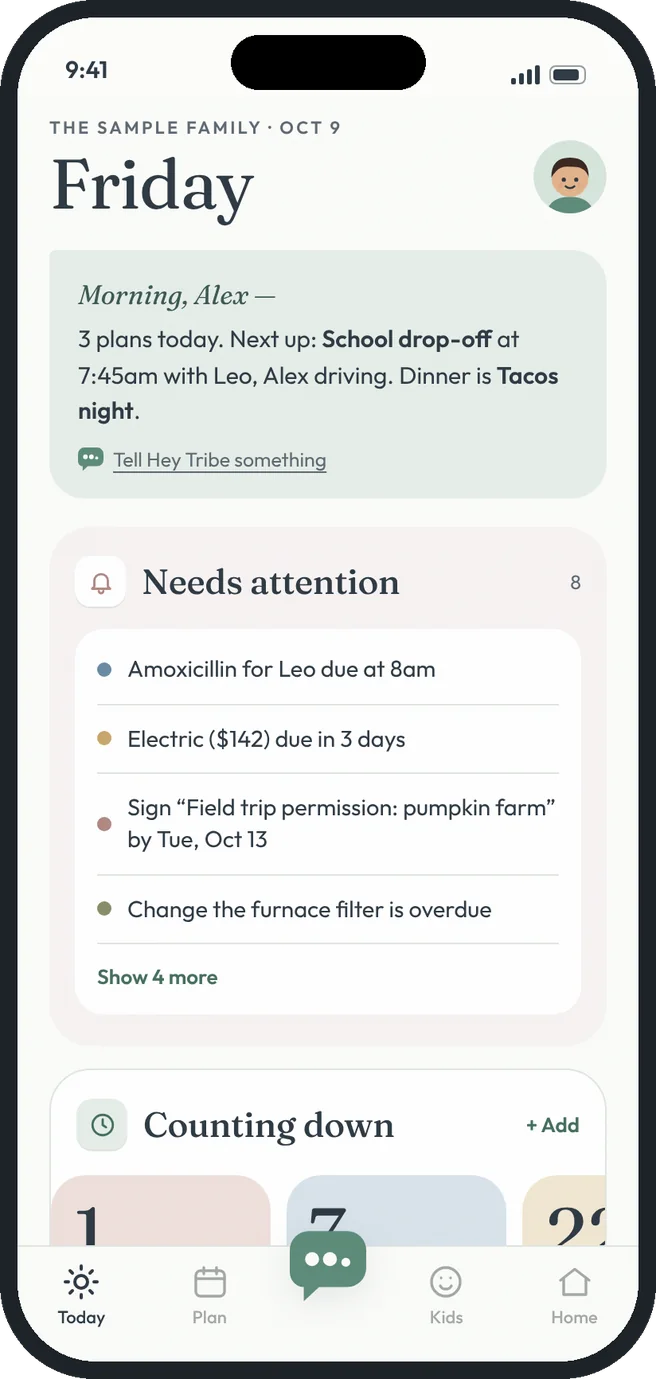
Today is the first thing everyone sees. A short briefing up top, then clear sections for what needs attention, what you're counting down to, today's plans, the notes on the fridge and a quick look at chores, dinner, groceries, meds and bills.
 everything, one glance
Today dashboard, the HeyTribe way.
Morning briefing
A few plain sentences about the day: what's next, who's driving and what's for dinner.
Needs attention
Medicine that's due, bills coming up, forms to sign, documents about to expire and trips to pack for.
Counting down
Big day counts for birthdays, trips and the last day of school, added by parents.
Today's plans
Every plan in order, with a “now” line so you can see what's left.
On the fridge
Notes, the family poll and who's home, at work or at school.
At a glance
Chores by person, dinner for the next few nights, groceries, meds given, bills due and more.
Free gets you going. Premium goes further.
- Customize your own Today: show, hide and reorder sections
- Today's plans with the “now” line
- At a glance: chores, dinner, groceries and bills
- Morning briefing written from your day
- Needs attention alerts for meds, bills, forms, documents and trips
- Meds given and baby feeds in At a glance
Three steps. That's it.
- 1
Open the app
Today is the first screen, so the whole house is waiting when you are.
- 2
Make it yours
Tap Customize this screen to hide, show and reorder sections. Each person sets their own.
- 3
Handle what needs you
Give the dose, pay the bill or vote on dinner, and it updates for everyone.
Good questions.
Can I change what's on my Today screen?
Yes. Tap Customize this screen at the bottom of Today to turn sections and At a glance cards on or off and move them up or down. Your layout is yours, so it doesn't change anyone else's.
Where do the alerts and summaries come from?
From what your family has already added: medicine times, bill due dates, form deadlines, chores, the dinner menu and the grocery list.
More answers in the help center.